
Projekt BISO 3 - Handbuch
Please note the System Requirements before starting the installation!
The Linux installation can be performed in the classic way or via a Docker image. The Docker image can be obtained from us on request.
(Adjust as needed)
docker run -d --name biso-prod \
        -v /PATH_TO_BISO_DATA/data:/var/www/html/data \
        -e GAIA_CONFIG=/PATH_TO_BISO_CONFIGURATION/config.php \
        -p 80:80 \
        biso:3.0.0
Install and configure the PostgreSQL server via the package manager.
Create DB user for BISO
CREATE ROLE biso WITH
        LOGIN
        INHERIT
        CREATEDB
        CREATEROLE
        NOREPLICATION
        ENCRYPTED PASSWORD 'xxxxxxxxxxxxxxxxxxxxxxxxxxxx';
Create database with the newly created user as owner.
CREATE DATABASE biso
        WITH
        OWNER = biso
        ENCODING = 'UTF8'
        LC_COLLATE = 'de_CH.utf8'
        LC_CTYPE = 'de_CH.utf8';
The provided DB dump can now be imported into this DB.
By default, PostgreSQL is delivered with values that serve compatibility more than performance. Therefore, it is important that certain configuration parameters are adjusted a bit after installation. These configuration parameters can be found in /etc/postgresql/postgresql.conf
shared_buffers: should be set to approx. 1/4 of the server memory, on Windows max. 512M, e.g.:
shared_buffers = 512MB
effective_cache_size: This is more of a planning decision for PostgreSQL, what it keeps in memory and what it writes to disk. The value should be approx. 1/2 of the available free memory. This should be determined via Task Manager. With 4GB total, this can easily be 1 GB, e.g.:
effective_cache_size = 1GB
autovacuum: This should definitely be enabled, and from time to time runs PostgreSQL's vacuum process (re-indexing, rearranging data, etc).
autovacuum = on
work_mem: Primarily required for all sorting options. This value is used per query and connection, so be careful with increasing it. I would calculate roughly like this: (available RAM / max. number of connections) rounded to 2^x. With approx. 2GB free RAM and 100 connections, this would be: 2GB / 100 = 16MB
work_mem = 16M
It might be good to check these settings and adjust them if necessary. This can bring quite a bit of performance to the DB. However, a PG server restart is necessary, so preferably try it during off-hours.
The following setting is a major performance boost especially on Windows systems:
update_process_title = off
Install the required packages for PHP as well as a webserver. The DocumentRoot of the webserver must point to [WEBROOT]/public.
Example Apache config:
<VirtualHost *:80>
    ServerName biso.example.com

    DocumentRoot /var/www/html/public

        # .....
</VirtualHost>
The php.ini file is stored in a different place depending on the system. The file can be found with php -i.
        ; Note: Enable the required PHP extensions, as per your distribution:
        ; Normally, extensions are enabled via the system's package manager, not in php.ini directly:
        ; fileinfo
        ; ftp
        ; gd
        ; intl
        ; json
        ; mb_string
        ; soap
        ; pdo
        ; pdo-pgsql
        ; opcache
        ; openssl
        ; xml
        ; zip

        ; e.g.:
        ; extension=fileinfo

        memory_limit = 256M
        date.timezone = "Europe/Zurich"
        post_max_size = 12M
        upload_max_filesize = 10M

        memory_limit = 256M
        date.timezone = "Europe/Zurich"
        post_max_size = 12M
        upload_max_filesize = 10M
The BISO installation package can be extracted and moved into WEBROOT.
The webserver user must have write and read access to the configured datadir (see config.php).
FOP is the Java tool for creating PDFs. It requires a fop.xconf file that configures the fonts used.
config.phpBISO is configured via the config.php file in webroot.
config.orig.php) to webroot/config.phpCreate DB user for BISO
CREATE ROLE biso WITH
        LOGIN
        NOSUPERUSER
        INHERIT
        CREATEDB
        CREATEROLE
        NOREPLICATION
        ENCRYPTED PASSWORD 'md5fbe75a7d98e04014c631dab39c6f85c0';
Create database with the newly created user as owner.
CREATE DATABASE biso
        WITH
        OWNER = biso
        ENCODING = 'UTF8'
        LC_COLLATE = 'German_Germany.1252'
        LC_CTYPE = 'German_Germany.1252'
        TABLESPACE = pg_default
        CONNECTION LIMIT = -1
    TEMPLATE = template0;
The provided DB dump can now be imported into this DB.
By default, PostgreSQL is delivered with values that serve compatibility more than performance. Therefore, it is important that certain configuration parameters are adjusted a bit after installation. These configuration parameters can be found in C:\BISO\PostgreSQL\data\postgresql.conf
shared_buffers: should be set to approx. 1/4 of the server memory, on Windows max. 512M, e.g.:
shared_buffers = 512MB
effective_cache_size: This is more of a planning decision for PostgreSQL, what it keeps in memory and what it writes to disk. The value should be approx. 1/2 of the available free memory. This should be determined via Task Manager. With 4GB total, this can easily be 1 GB, e.g.:
effective_cache_size = 1GB
autovacuum: This should definitely be enabled, and from time to time runs PostgreSQL's vacuum process (re-indexing, rearranging data, etc).
autovacuum = on
work_mem: Primarily required for all sorting options. This value is used per query and connection, so be careful with increasing it. I would calculate roughly like this: (available RAM / max. number of connections) rounded to 2^x. With approx. 2GB free RAM and 100 connections, this would be: 2GB / 100 = 16MB
work_mem = 16M
It might be good to check these settings and adjust them if necessary. This can bring quite a bit of performance to the DB. However, a PG server restart is necessary, so preferably try it during off-hours.
The following setting is a major performance boost especially on Windows systems:
update_process_title = off
PHP can be downloaded from the following homepage (VC15 x64 Non Thread Safe): https://windows.php.net/download
The downloaded ZIP file is extracted to C:\BISO\php.
The file "php.ini-production" is renamed to "php.ini" and edited:
    // Defines file permissions within IIS
    fastcgi.impersonate = 0
    fastcgi.logging = 0
    cgi.fix_pathinfo=1
    cgi.force_redirect = 0

    extension_dir = "C:\BISO\php\ext"
        extension=ftp
        extension=fileinfo
        extension=gd2
        extension=mbstring
        extension=openssl
        extension=pdo_pgsql
        extension=soap

        memory_limit = 256M
        date.timezone = "Europe/Zurich"

        post_max_size = 12M
        upload_max_filesize = 10M
Remove semicolon (and set path). Some may already be enabled, or not present at all:
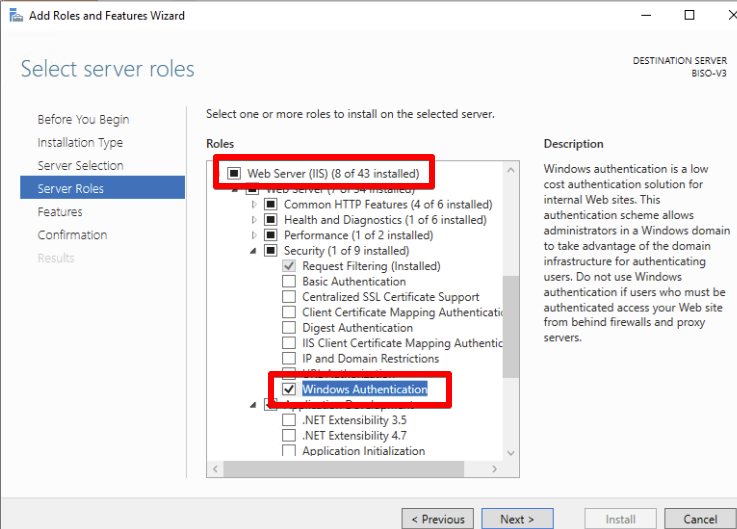
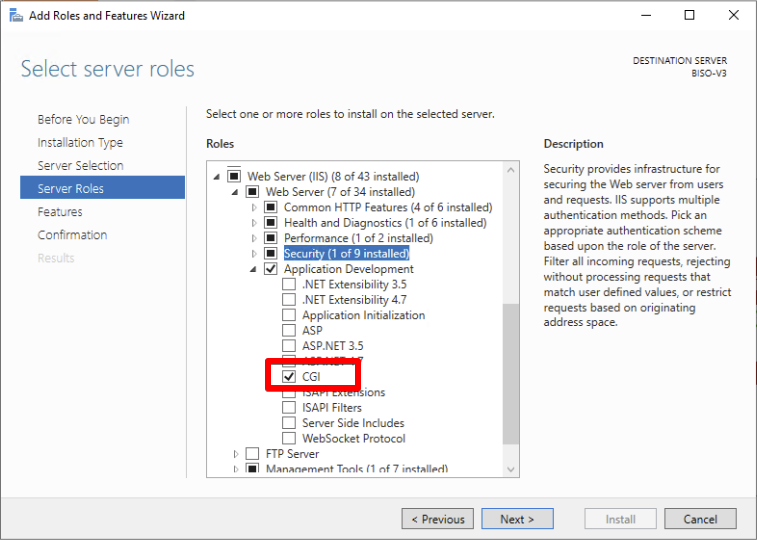
IIS 8 can be added as a role via Server Manager.
The fields marked in red must still be selected manually:
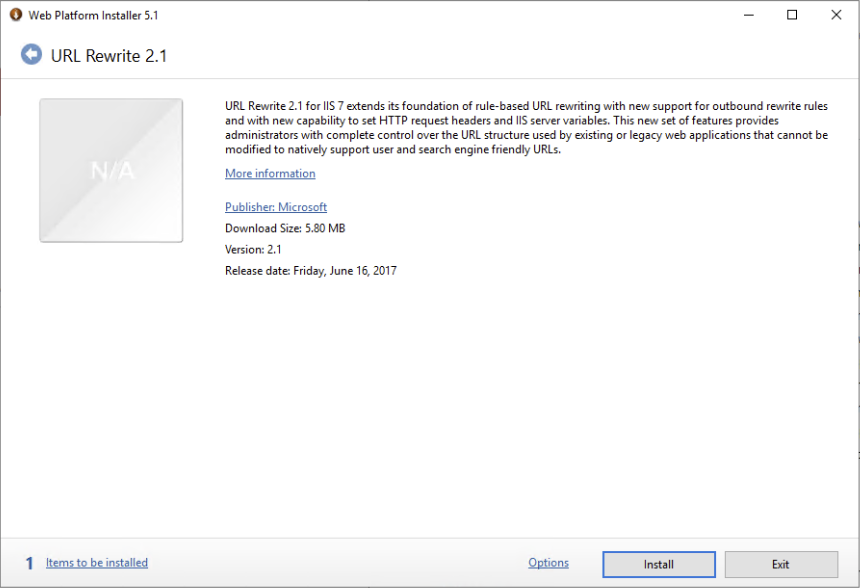
Additionally, the URL Rewrite 2.1 extension must be installed, which can be downloaded at https://www.iis.net/downloads/microsoft/url-rewrite:
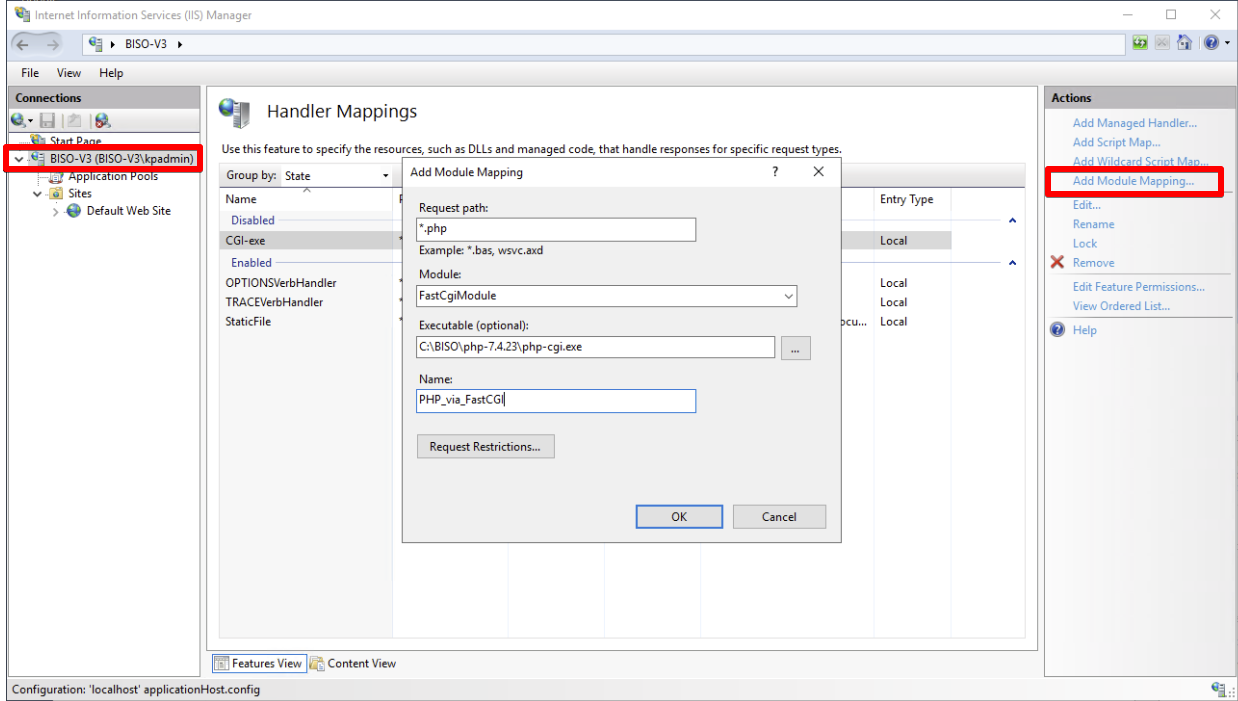
In Internet Information Services (IIS) Manager under Server -> Handler Mappings, a module mapping can now be added. The opened window can be filled out as follows:
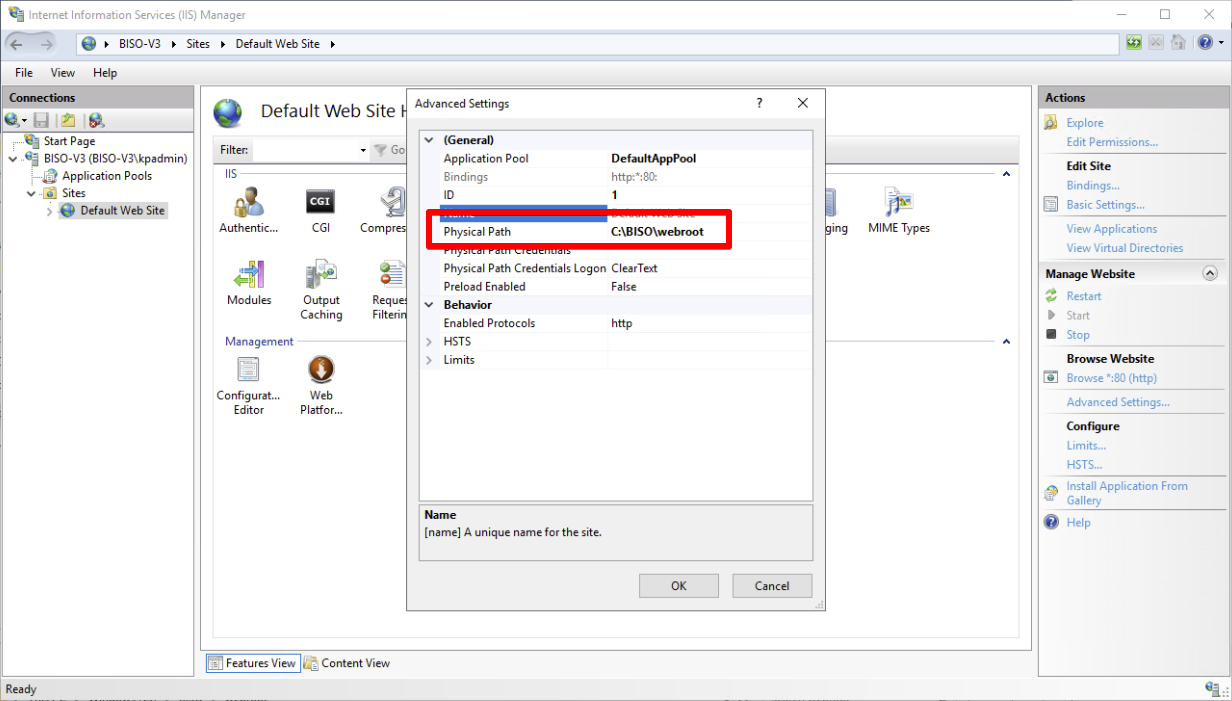
The Default Site can now be renamed (e.g. BISO). By right-clicking the site, the path to the BISO root directory can also be adjusted:
The BISO installation package can be extracted and moved into WEBROOT.
The user "IIS APPOOOL\DefaultAppPool" or IISUSER may possibly need write and read rights on the Temp and Data directories if no other user was defined in IIS.
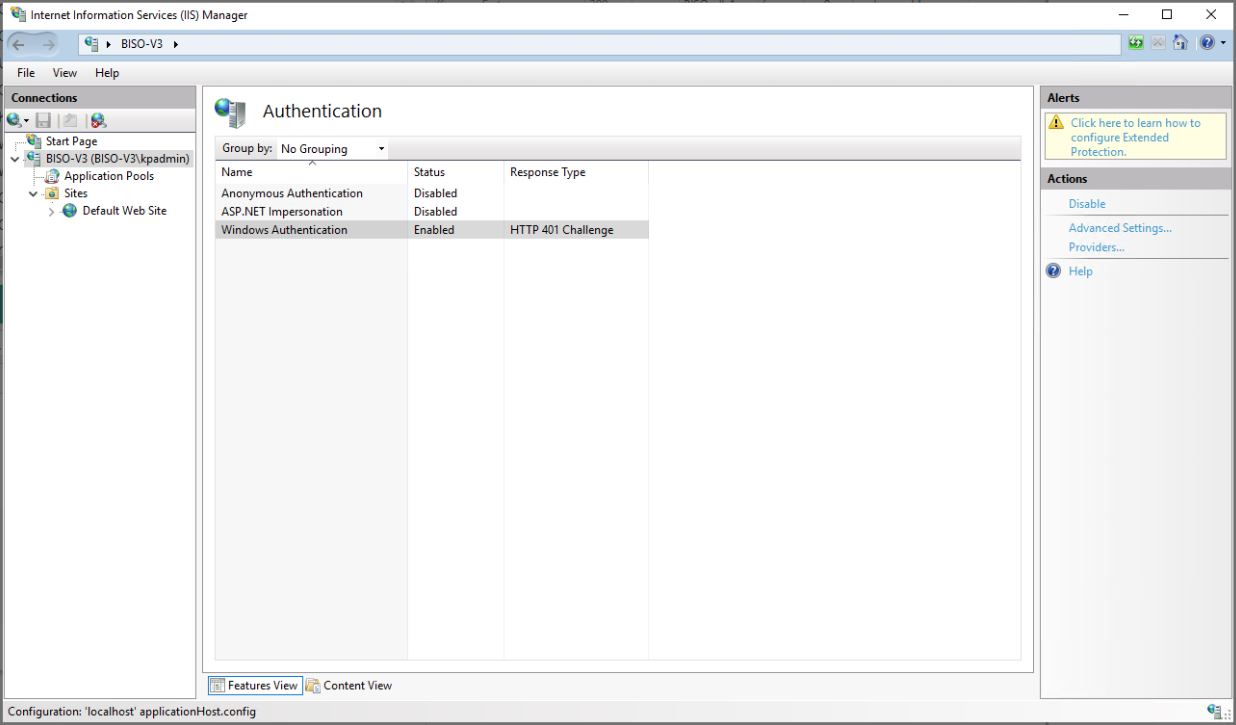
Under Sites -> Default -> Authentication, the following must be set.
Windows Authentication -> Enable Anonymous Authentication -> Disabled All others -> Disabled
Furthermore, the following must be adjusted in the BISO configuration (C:\BISO\webroot\config.php).
if (php_sapi_name() !== 'cli') {
        Config::set('remote_user', preg_replace('/^.*\\\\/', '', $_SERVER['REMOTE_USER']));
        Config::set('remote_user_auth', true);
}
Before the update, a DB/file backup of BISO should be created.
Extract update package and sync the files with rsync.
rsync -a -b \
        --backup-dir=/tmp/BISO_UPDATE/deleted \
        --delete \
        --progress \
        --exclude=config.php \
        --exclude=fonts \
        --exclude=data \
        --exclude=components/phpdocx/config/phpdocxconfig.ini \
        /tmp/BISO_UPDATE/WEBROOT/ /PATH/TO/WEBROOT
cd /PATH/TO/WEBROOT
php ./biso-cli migration exec
Before the update, a DB/file backup of BISO should be created.
Extract update package and copy the files into the BISO folder (replace existing files)
C:\BISO\webroot
C:\BISO\php\php.exe biso-cli migration exec
The configuration of a new customer in BISO is based on an existing installation. This simplifies the configuration significantly, but requires a few targeted data deletions in the database.
In table params, set column kunde to the desired value.
KP.param.FormIn the parameter panel (ExtJS file KP.param.Form), the customer must be added in the selection list.
Place a file {params.kunde}.svg in directory webroot/public/resources/images/wappen/
Copy the following template folders:
webroot/templates/default/ --> webroot/templates/[kunde]/webroot/public/app/src/kunden_spec/[existing customer] --> webroot/public/app/src/kunden_spec/[kunde]/beilage beratungsfall bf_bericht bf_dokument bf_link_typ bf_log bf_notiz bf_termin bf_termin_protokoll bf_workshop_link bf_workshop_termin brief_abschnitt hilfe_themen import_inbox information information_institution inst_schulstufe_link involvierte_institution involvierte_person job job_step leistung login_log modul passwort_log person_funktions_spezialisierungen prod_in_modul qm_abschlussmodalitaet qm_beratungergebnis qm_beratungverlauf qm_beschaeftigungssituation qm_eigenaktivitaetklient qm_fragestellunganlass qm_katalog qm_laufendeausbildung qm_letzterausbildungabschluss qm_messages qm_selbstproblemloesungbefaehigung qm_zielerreichung qm_zuweisendestelle raumsituation rechnung search_settings settings teilsummen_gruppen_rechnungen termin_publikations_mailboxen textbausteine uebermittlungslauf value_map veranstalt_leistung veranstalt_termin veranstalter veranstaltung workshop workshop_block_in_workshop workshop_plan
anschlussloesung ausbildung ausbildung_richtung ausweis_kat begruendung_kostenbefreiung benutzer benutzer_gruppe beratung_erfahren_durch beratungsfall_ergebnis beratungsfall_fragestellung bezirk bf_archiv_status bf_bericht_vorlage bf_ergebnis bf_fragestellung bf_termin_absage_grund bf_termin_besprechungsart bf_termin_thema bf_typ bf_typ_kategorie bf_uebergang brief_vorlage brief_abschnitt brueckenangebot deutsch_niveau dokument_vorlagen empfaenger_vorlage ergebnis_arbeitsmarktfaehigkeitscheck fakultaet fakultaet_ausbildungs_richtung feiertag funkt_kategorie funktion funktions_spezialisierungen gemeinde gruppe inst_typ_kategorie institution_typ kanton login mehrfachbelastung muttersprache nationalitaet param plz plz_in_bezirk prod_typ reporting_tables resultat schul_funktion schul_klasse schul_stufe situation sozialhilfe sprache sr_gruppe stunden titel treffpunkt veranstalt_typ zeit_dauer zielgruppe funkt_pers_link person institution memo_texte mitarbeiter produkt
bl_mentoring_import_personen